

Tuesday, September 11, 2012
Disable The Desktop Cleanup Wizard

Friday, August 3, 2012
DOS Commands

DOS Commands (DOS Prompt)
Command-line reference A-Z
To find information about a command, on the A-Z button menu at the top of this page, click the letter that the command starts with, and then click the command name.In addition to the tools installed with Windows XP , there are over 40 support tools included on the Windows XP CD. You can use these tools to diagnose and resolve computer problems. For more information about these support tools, see Windows Support Tools
Wednesday, August 1, 2012
Disable Error Reporting in Windows XP

As you may have noticed, every time a Microsoft program crashes in Windows XP,an 'Error Report' screen pops up allowing you to send some information on the crash to Microsoft.Well this can get quite annoying, so you can follow these steps to disable it.
Friday, July 27, 2012
Change the Size & Font of Desktop Icons
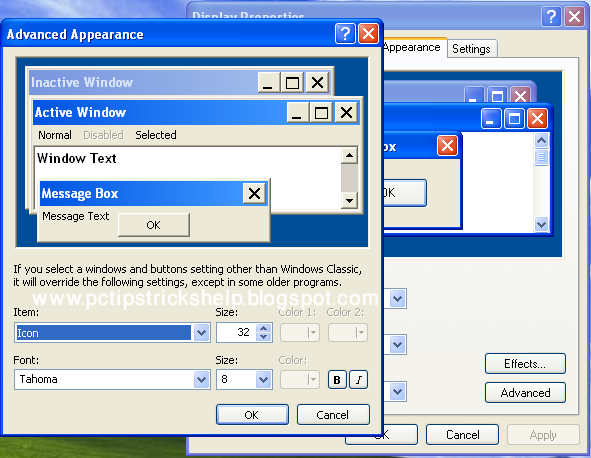
You can make your desktop icons and text as big or as small as you want by following these steps:
Tuesday, July 24, 2012
Turn Off Thumbnail Caching

Every time you go into a folder which contains either pictures or movies, Windows creates a thumbnail image so you can see what that picture/movie is. The thumbnail cache helps speed up access to the thumbnails instead of having them load up every time you go into a folder, but each picture you have in a folder will take up around 2kb's. Follow these steps to disable this:
